n8n Cloud vs self-hosted (2026): cost, effort and which to pick
By TestedFlows · Published October 15, 2026 · Prices checked October 15, 2026
This page contains affiliate links. If you sign up through them we may earn a commission, at no extra cost to you. How we make money.
The short version
| n8n Cloud | Self-hosted (Community Edition) | |
|---|---|---|
| Monthly cost | from €24, or €20 billed yearly (checked Oct 15, 2026) | server only, from about $6.50 (checked Oct 15, 2026) |
| Execution limit | 2,500 (Starter) or 10,000 (Pro) a month | None, limited only by your server |
| Setup time | Minutes | About 30 to 60 minutes |
| Updates and backups | Done for you | Your job |
| Community nodes | Verified nodes only | Any node from npm |
| Data location | n8n’s shared cloud infrastructure | Your own server |
| Team features (projects, sharing) | Included in Cloud plans | Need a paid Business license |
| Support | Forum on Starter; more on higher plans | Community forum |
Total cost: more than the sticker price
Comparing €24 a month with a $6.50 server is not the full picture. Self-hosting has a time cost, and Cloud has a growth cost.
| Monthly volume | n8n Cloud | Self-hosted |
|---|---|---|
| Up to 2,500 runs | Starter €24 (€20 yearly) (checked Oct 15, 2026) | about $6.50 to $12 server (checked Oct 15, 2026) + about 1 hour a month of upkeep |
| Up to 10,000 runs | Pro €60 (€50 yearly) (checked Oct 15, 2026) | Same server, often still enough + about 1 hour a month |
| 40,000+ runs or long AI jobs | Larger Pro tiers or Business | A bigger server, around $15 to $30 (checked Oct 15, 2026), or queue mode across several workers |
The upkeep hour covers applying updates, checking backups and glancing at disk space. If your time is worth more than the difference, Cloud is the better deal at low volume. At high volume, self-hosting saves money every month and the gap keeps widening. For the full breakdown of plans and what counts as an execution, see n8n pricing explained.
Maintenance and reliability
On Cloud, n8n runs the servers, monitors them and applies security and stability updates automatically. You still have some control: in the Cloud admin dashboard you can choose your n8n version, pick the stable or beta release track, set how often you get updates, and restrict upgrades to a maintenance window.
Self-hosted, all of that is yours. You decide when to update, which is useful when a new version changes something your workflows depend on, but you also have to remember to do it. You are responsible for:
- Applying updates, ideally every few weeks, after reading the release notes
- Backing up the database and, most importantly, the encryption key
- Keeping the server patched and the firewall tight
- Fixing problems when the server runs out of memory or disk at 3am
None of this is hard with Docker. Our self-hosting guide covers setup, HTTPS, backups and updates in about 30 minutes. But it is ongoing work, and if workflows run business-critical processes, someone needs to own it.
Features and limits
The core editor, nodes and AI features are the same on both. The differences are at the edges.
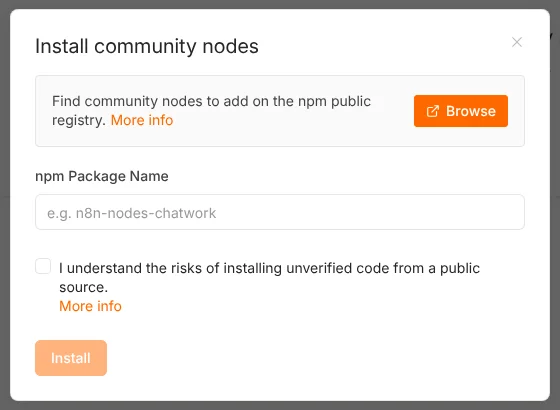
Community nodes. Self-hosted n8n can install any community node from npm, including unverified ones. n8n Cloud only allows nodes that n8n has verified. If your workflow depends on a niche community node, check whether it is verified before choosing Cloud.
Execution time and concurrency. Cloud Starter stops a single run after 5 minutes and runs 5 workflows at once; Pro raises the time limit to 40 minutes. Self-hosted has no fixed limits beyond your server’s capacity, which matters for long AI agents and large data jobs.
Team features. On Cloud, projects and sharing come with the plans. The free self-hosted Community Edition does not include projects, sharing of workflows and credentials, Git version control, environments or SSO. Those need a Business or Enterprise license. A solo builder rarely misses them; a team of five usually does.
Files and environment. Self-hosted n8n can read and write files on the server, use custom environment variables, and run alongside your own databases on a private network. Cloud is more locked down, by design.
Security and data
Cloud runs on shared infrastructure managed by n8n. You do not touch servers, patches or certificates, which removes a whole class of mistakes. Outbound requests come from shared IP addresses that n8n publishes, so you can allowlist them, but n8n recommends always requiring authentication too, since the addresses are shared with other customers.
Self-hosted keeps every workflow, credential and execution log on a server you control. That is often a requirement for agencies with strict clients, healthcare and finance work, or companies that cannot send customer data to a third party. The trade-off is that security is now your responsibility: a weak password or an open port is your problem, not n8n’s.
Strengths and weaknesses
n8n Cloud
Strengths
- Running in minutes, no server knowledge needed
- Updates, uptime and backups handled by n8n
- Projects and sharing included
- Free trial with Pro features
Weaknesses
- Monthly execution limits
- Costs step up as volume grows
- Verified community nodes only
- Shorter run time limit on Starter
Self-hosted
Strengths
- No execution limits
- Lowest cost at any real volume
- Any community node, full file and network access
- Data stays on your own server
Weaknesses
- You handle updates, backups and security
- Team features need a paid license
- Downtime is yours to fix
Which should you choose?
| Your situation | Recommendation |
|---|---|
| Trying n8n for the first time | Cloud trial, no credit card needed |
| Non-technical team, modest volume | Cloud Starter or Pro |
| Freelancer or developer, any volume | Self-hosted |
| Agency running workflows for many clients | Self-hosted, one instance per client or a larger shared server |
| Strict data residency or compliance needs | Self-hosted, or Enterprise |
| Team needing SSO, Git and environments | Cloud Enterprise, or self-hosted Business |
A common path is to start on the Cloud trial to learn n8n, then move to a VPS once workflows go into production and volume grows.
Moving from Cloud to self-hosted
Switching later is straightforward:
- Set up your own instance with our Docker guide.
- In Cloud, open each workflow, choose Download from the menu, and save the JSON file. With many workflows, the n8n API can export them in bulk.
- In your new instance, use Import from file for each workflow.
- Recreate your credentials. They are encrypted with each instance’s own key, so they cannot be copied across.
- Update any webhook URLs in the services that call them, since the domain changes.
- Activate the workflows and cancel the Cloud plan once everything runs.
Frequently asked questions
Is self-hosted n8n really free?
Yes, the Community Edition is free to use for your own business, including building workflows for clients. You pay only for the server. Selling access to n8n itself as a hosted service needs a commercial agreement with n8n.
Is self-hosted n8n less secure than Cloud?
Not by nature, but it depends on you. A well-configured server with HTTPS, a firewall, strong passwords and regular updates is secure. A forgotten, unpatched server is not. If nobody will maintain it, Cloud is the safer choice.
Can I use n8n Cloud and self-hosted together?
Yes. Some teams use Cloud for business users and a self-hosted instance for heavy or sensitive workflows. Workflows move between them as JSON files.
How big a server do I need?
For most small teams, 2 GB of RAM is enough to start and 4 GB is comfortable, especially with AI workflows. Our self-hosting guide compares current VPS plans.
Sources: n8n pricing, choosing Cloud or self-hosting, updating n8n Cloud, n8n Cloud IP addresses, community nodes on Cloud and self-hosted, Community Edition features.
Get the free workflow template pack
Tested n8n workflows you can import in one click, plus a short email when new templates and comparisons go live.