How to self-host n8n on a VPS with Docker (2026 guide)
By TestedFlows · Published October 15, 2026 · Prices checked October 14, 2026
This page contains affiliate links. If you sign up through them we may earn a commission, at no extra cost to you. How we make money.
Self-hosting n8n means the software runs on a server you rent, not on n8n’s cloud. The Community Edition is free to self-host, so your only bill is the server. You also get no execution limits and full control over your data.
This guide sets up n8n with Docker Compose and Traefik on a Linux VPS. Traefik gets a free HTTPS certificate from Let’s Encrypt and renews it on its own. At the end you will have n8n running at an address like https://n8n.yourdomain.com, restarting automatically after a reboot, with a simple backup.
What you need: a VPS running Ubuntu 24.04, a domain you can add DNS records to, and about 30 minutes. You should be comfortable typing commands into a terminal.
Step 1: Pick a server
n8n itself is light. One vCPU and 2 GB of RAM is enough for a few dozen workflows. If you plan to run AI agents, process large files or keep many workflows active, choose 4 GB or more.
| Provider | Plan | Specs | Price |
|---|---|---|---|
| Hostinger | KVM 1 | 1 vCPU, 4 GB RAM, 50 GB NVMe | $6.49/month intro, renews at $11.99 (checked Oct 14, 2026) |
| Hostinger | KVM 2 | 2 vCPU, 8 GB RAM, 100 GB NVMe | $8.99/month intro, renews at $14.99 (checked Oct 14, 2026) |
| DigitalOcean | Basic 2 GB | 1 vCPU, 2 GB RAM, 50 GB SSD | $12/month (checked Oct 14, 2026) |
| DigitalOcean | Basic 4 GB | 2 vCPU, 4 GB RAM, 80 GB SSD | $24/month (checked Oct 14, 2026) |
Hostinger gives more memory for the money but bills the whole term upfront, and the low price is for the first term only. DigitalOcean bills monthly with no long contract, which suits testing.
See Hostinger VPS plans See DigitalOcean DropletsWhen you create the server, choose Ubuntu 24.04 as the operating system. Note the server’s public IP address.
Step 2: Point a subdomain at the server
In your domain’s DNS settings, add an A record:
- Name:
n8n - Value: your server’s IP address
- If your DNS is on Cloudflare, set the proxy to DNS only (grey cloud) for now, so Let’s Encrypt can issue the certificate directly.
DNS changes usually take a few minutes. You can check with ping n8n.yourdomain.com and confirm it shows your server’s IP.
Step 3: Install Docker
Connect to the server over SSH:
ssh root@YOUR_SERVER_IPUpdate the system and install Docker with its official script, which includes the Compose plugin:
apt update && apt upgrade -y
curl -fsSL https://get.docker.com | sh
docker --version
docker compose version
Both version commands should print a version number. If you see one, Docker is ready.
Turn on the firewall and allow only SSH and web traffic:
ufw allow OpenSSH
ufw allow 80
ufw allow 443
ufw enable
Step 4: Create the project folder and settings
mkdir -p ~/n8n && cd ~/n8n
mkdir local-files
nano .env
Paste the following into .env, replacing the example values with your own:
DOMAIN_NAME=yourdomain.com
SUBDOMAIN=n8n
GENERIC_TIMEZONE=Europe/London
SSL_EMAIL=you@yourdomain.com
N8N_ENCRYPTION_KEY=paste-a-long-random-string-here
Generate the encryption key with openssl rand -hex 32 and paste the result. n8n uses this key to encrypt the passwords and API keys you save in credentials. Store a copy somewhere safe. If you lose it, a restored backup cannot read your saved credentials.
Save with Ctrl + O, press Enter, then exit with Ctrl + X.
Step 5: Write the Compose file
nano compose.yamlPaste this:
services:
  traefik:
    image: traefik:v3
    restart: always
    command:
      - "--providers.docker=true"
      - "--providers.docker.exposedbydefault=false"
      - "--entrypoints.web.address=:80"
      - "--entrypoints.web.http.redirections.entrypoint.to=websecure"
      - "--entrypoints.web.http.redirections.entrypoint.scheme=https"
      - "--entrypoints.websecure.address=:443"
      - "--certificatesresolvers.le.acme.tlschallenge=true"
      - "--certificatesresolvers.le.acme.email=${SSL_EMAIL}"
      - "--certificatesresolvers.le.acme.storage=/letsencrypt/acme.json"
    ports:
      - "80:80"
      - "443:443"
    volumes:
      - traefik_data:/letsencrypt
      - /var/run/docker.sock:/var/run/docker.sock:ro

  n8n:
    image: docker.n8n.io/n8nio/n8n:stable
    restart: always
    ports:
      - "127.0.0.1:5678:5678"
    labels:
      - traefik.enable=true
      - traefik.http.routers.n8n.rule=Host(`${SUBDOMAIN}.${DOMAIN_NAME}`)
      - traefik.http.routers.n8n.entrypoints=websecure
      - traefik.http.routers.n8n.tls=true
      - traefik.http.routers.n8n.tls.certresolver=le
      - traefik.http.services.n8n.loadbalancer.server.port=5678
    environment:
      - N8N_HOST=${SUBDOMAIN}.${DOMAIN_NAME}
      - N8N_PORT=5678
      - N8N_PROTOCOL=https
      - N8N_WEBHOOK_URL=https://${SUBDOMAIN}.${DOMAIN_NAME}/
      - NODE_ENV=production
      - GENERIC_TIMEZONE=${GENERIC_TIMEZONE}
      - TZ=${GENERIC_TIMEZONE}
      - N8N_ENCRYPTION_KEY=${N8N_ENCRYPTION_KEY}
    volumes:
      - n8n_data:/home/node/.n8n
      - ./local-files:/files

volumes:
  n8n_data:
  traefik_data:
What each part does:
- traefik listens on ports 80 and 443, sends plain HTTP to HTTPS, and requests a certificate for your subdomain.
- n8n is only reachable through Traefik. Port 5678 is bound to
127.0.0.1, so nobody can reach it directly from the internet. - n8n_data is a Docker volume holding n8n’s database and settings. It survives restarts and updates.
- local-files is a shared folder for nodes that read or write files on disk. Inside n8n it appears as
/files. :stablepins n8n to the stable release line, not beta.
On n8n versions older than 2.30, replace N8N_WEBHOOK_URL with WEBHOOK_URL. The stable tag is already newer than that, so most readers can leave it as is.
Step 6: Start n8n
docker compose up -d
docker compose logs -f n8n
Wait until the log shows that the editor is accessible, then press Ctrl + C to stop following the log. n8n keeps running.
Open https://n8n.yourdomain.com in your browser. The first visit asks you to create the owner account. Use a strong password, since this page is on the public internet.
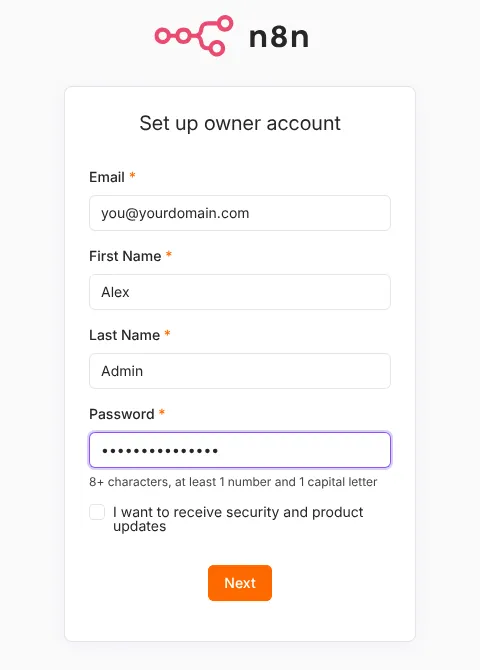
If the page does not load, check three things in this order: the A record points to the right IP, ports 80 and 443 are open in ufw and in your provider’s firewall, and docker compose logs traefik shows no certificate errors.
Step 7: Test a webhook
Webhooks are the most common thing to break on a self-hosted install, so test one now.
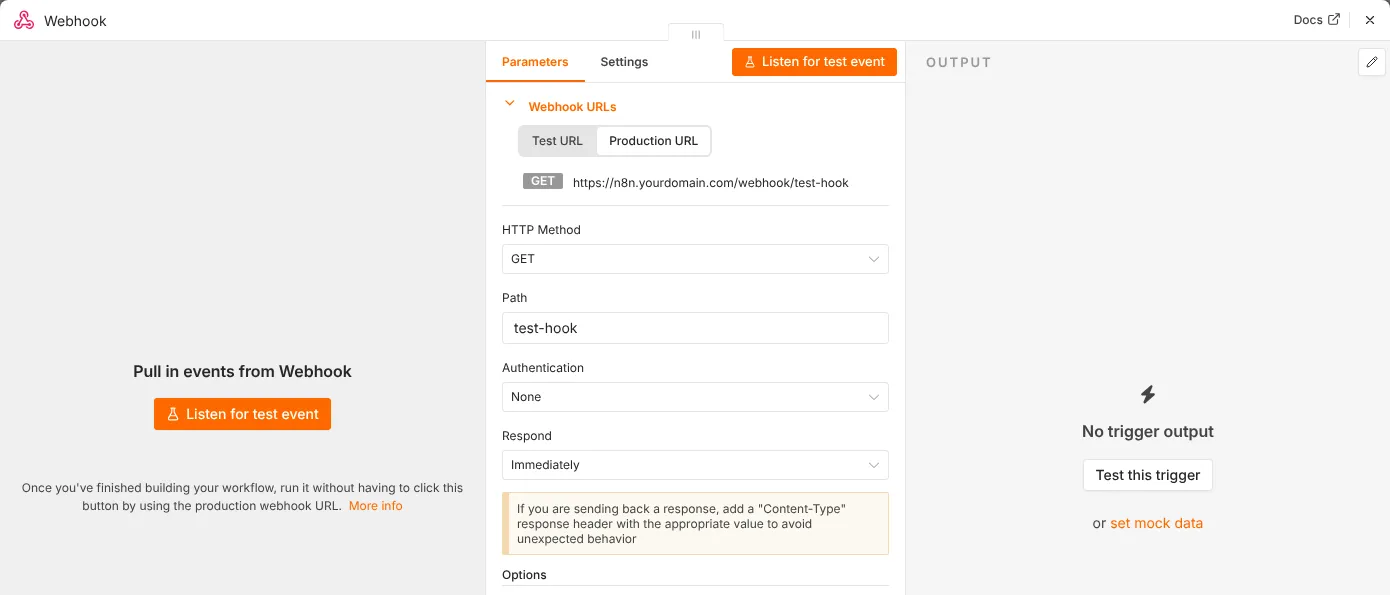
- Create a new workflow and add a Webhook node.
- Copy its Production URL. It should start with
https://n8n.yourdomain.com/webhook/. If it showslocalhost, theN8N_WEBHOOK_URLline is wrong. - Activate the workflow and open the URL in your browser. You should see a success message, and the execution appears under Executions.
Step 8: Back up your data
Everything n8n stores lives in the n8n_data volume. This command stops n8n for a few seconds, copies the volume into a dated archive, and starts it again:
cd ~/n8n
docker compose stop n8n
docker run --rm -v n8n_n8n_data:/data -v ~/n8n-backups:/backup alpine \
  tar czf /backup/n8n-$(date +%F).tar.gz -C /data .
docker compose start n8n
Copy the archives off the server from time to time, for example to your own computer with scp. Also export important workflows as JSON from the editor. Most VPS providers sell automatic snapshots as well, which is the simplest extra layer.
Step 9: Update n8n
n8n releases updates often. To update:
cd ~/n8n
docker compose pull
docker compose up -d
Take a backup first, and read the release notes before jumping several versions at once. Your workflows and credentials stay in the volume, so updating does not touch them.
What it really costs
| Item | Monthly cost |
|---|---|
| n8n Community Edition | Free |
| VPS (2 to 4 GB RAM) | about $6.50 to $24 (checked Oct 14, 2026) |
| Domain | about $1 (around $10 to $12 a year) |
| HTTPS certificate | Free (Let’s Encrypt) |
Compare that with n8n’s own cloud, where the Starter plan is €20/month billed yearly, for 2,500 executions (checked Oct 14, 2026). Self-hosting has no execution limit; you are limited only by the server’s capacity. Try your own numbers in the automation cost calculator.
Self-hosting vs n8n Cloud
Strengths
- Unlimited executions for a fixed server price
- Your data stays on your own server
- Full control over versions, environment variables and community nodes
Weaknesses
- You handle updates, backups and security
- Downtime is your problem to fix
- Some paid features such as SSO need a paid license
If you would rather not manage a server, n8n Cloud runs everything for you and has a free trial.
Try n8n CloudCommon problems
The browser says the connection is not secure. The certificate has not been issued yet. Check that the A record is correct, that Cloudflare’s proxy is off (grey cloud) for the subdomain, and run docker compose logs traefik to see the error.
Webhook URLs show localhost. N8N_WEBHOOK_URL is missing or wrong in compose.yaml. Fix it and run docker compose up -d again.
Credentials stopped working after a restore. The encryption key on the new server is different from the old one. Put the original N8N_ENCRYPTION_KEY back into .env and restart.
Scheduled workflows run at the wrong time. Set GENERIC_TIMEZONE to your own timezone, then restart.
n8n is slow or crashes. Check memory with free -h. If it is close to full, move to a plan with more RAM.
Next steps
Your server is ready for real workflows. Browse the free workflow templates to import one in a click, and see the other n8n guides for securing, scaling and connecting n8n to AI tools.
Sources: n8n Docker Compose setup, n8n pricing, Hostinger VPS pricing, DigitalOcean Droplet pricing.
Get the free workflow template pack
Tested n8n workflows you can import in one click, plus a short email when new templates and comparisons go live.