n8n pricing explained (2026): plans, executions and real costs
By TestedFlows · Published October 15, 2026 · Prices checked October 15, 2026
This page contains affiliate links. If you sign up through them we may earn a commission, at no extra cost to you. How we make money.
The two ways to pay for n8n
n8n comes in two forms, and they are priced completely differently.
n8n Cloud is the hosted service. n8n runs the servers, handles updates and backups, and you pay a monthly plan based on how many workflow executions you need.
Self-hosted n8n runs on a server you control. The Community Edition costs nothing to use for your own business; you pay only for the server. Paid self-hosted plans (Business and Enterprise) add team and governance features through a license key.
n8n Cloud plans
| Plan | Price | Executions per month | Who it suits |
|---|---|---|---|
| Starter | €24/month, or €20/month billed yearly (checked Oct 15, 2026) | 2,500 | Freelancers and small teams starting out |
| Pro | €60/month, or €50/month billed yearly (checked Oct 15, 2026) | 10,000 (larger tiers available) | Teams running automations in production |
| Business | €667/month billed yearly (checked Oct 15, 2026) | 40,000 | Companies needing Git, environments and SSO (self-hosted) |
| Enterprise | Custom | Custom | Large organisations needing SLAs and compliance features |
All plans include unlimited workflows and unlimited users. Prices are in euros and exclude VAT. Yearly billing saves about 17%.
The main differences between Starter and Pro, beyond the execution count:
- Concurrent executions: Starter runs 5 workflows at the same time; Pro allows considerably more. If many webhooks arrive at once on Starter, the extra runs wait in a queue.
- Execution time limit: a single run can last up to 5 minutes on Starter and 40 minutes on Pro. Long AI or data-processing workflows need Pro.
- History: Starter keeps 7 days of execution logs and 1 day of workflow version history; Pro keeps 30 days of logs and 5 days of history.
- Admin roles and shared projects: Pro adds admin roles and more shared projects for teams.
There is a free trial on Starter and Pro with no credit card needed, so you can test before paying. Companies with fewer than 20 employees can apply for n8n’s startup plan, which takes 50% off Business.
What counts as an execution
An execution is one complete run of a workflow, from trigger to finish. The number of steps inside it does not matter, and neither does the amount of data it handles.
To show this, we ran a five-step workflow three times. n8n recorded three executions, one per run, even though each run passed through six nodes:
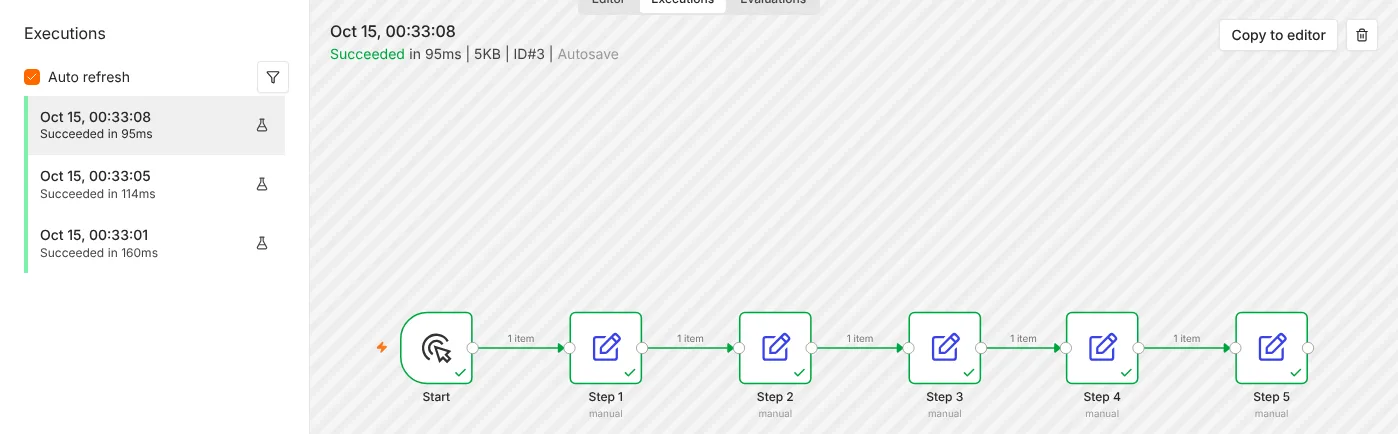
According to n8n’s documentation, only production executions count towards your plan: runs started automatically by a trigger, schedule or polling. These do not count:
- Manual test runs you start from the editor while building
- Sub-workflow runs: when one workflow calls another, only the parent counts
- Error workflow runs that fire when something fails
This matters for cost planning. You can test as much as you like without using your quota, and splitting a large workflow into sub-workflows does not multiply your usage.
What happens if you go over
On n8n Cloud, workflows keep running when you pass your monthly execution limit; n8n does not switch them off. Instead, you may be charged for the overage or asked to upgrade to the next tier, and n8n’s team contacts you as you approach the limit. Check the current overage terms on the pricing page before relying on this, and keep an eye on usage in your Cloud dashboard.
Self-hosted n8n: what is free
The Community Edition is the standard version of n8n that you install yourself. It has no execution limit, no workflow limit and no user limit. Your limits are only the size of your server.
It is released under n8n’s Sustainable Use License, which allows you to use and modify n8n “for your own internal business purposes or for non-commercial or personal use.” In practice, that means:
- Allowed: running your own company’s automations, and building workflows for clients as a consultant or agency.
- Not allowed without a commercial agreement: selling access to n8n itself, for example offering a hosted n8n service or a white-labelled version to customers.
If you are unsure where your use case falls, read the license text or ask n8n directly.
Some team and governance features are not in the Community Edition. These include projects and sharing of workflows and credentials between users, Git version control, multiple environments, SSO (SAML and LDAP), external secrets, custom variables and log streaming. A free registration of the Community Edition unlocks a few extras: folders, debug in editor and custom execution data.
For a solo builder or a small team where one person manages the workflows, the Community Edition covers almost everything. Teams that need permissions, staging environments or SSO will want the Business plan.
What self-hosting really costs
| Item | Monthly cost |
|---|---|
| n8n Community Edition | Free |
| VPS with 2 to 4 GB RAM | about $6.50 to $24 (checked Oct 15, 2026) |
| Domain | about $1 (around $10 to $12 a year) |
| HTTPS certificate | Free with Let’s Encrypt |
| Your time | About 30 minutes to set up, plus occasional updates |
A Hostinger KVM 1 server with 4 GB of RAM is $6.49/month on the introductory term, renewing at $11.99 (checked Oct 14, 2026). Our step-by-step guide to self-hosting n8n with Docker covers the setup, HTTPS and backups.
See Hostinger VPS plansWhich option is cheapest for you
| Your situation | Best value |
|---|---|
| Testing n8n or learning | Free Cloud trial, or self-host on a small VPS |
| Under 2,500 runs a month, no server skills | Cloud Starter |
| 2,500 to 10,000 runs a month, no server skills | Cloud Pro |
| Any volume, comfortable with a Linux server | Self-hosted Community Edition |
| Team needing SSO, Git and environments | Business (self-hosted), or the startup plan if eligible |
Self-hosting becomes the obvious choice once you pass a few thousand executions a month or run long AI workflows: the server cost stays flat while Cloud plans step up. If you would rather spend your time building workflows than maintaining a server, Cloud Starter or Pro is worth the extra cost.
How n8n compares with Zapier and Make
n8n’s per-run pricing is its biggest advantage. Zapier charges a task for every action step, and Make charges a credit for nearly every module, so their costs grow with workflow length. A four-action workflow run 2,000 times a month uses 8,000 Zapier tasks but only 2,000 n8n executions. See the full breakdowns in n8n vs Zapier and n8n vs Make, or try your own numbers in the cost calculator.
Frequently asked questions
Is n8n really free?
The self-hosted Community Edition is free to use for your own business and for client work, with no execution limits. You pay for the server it runs on. n8n Cloud is a paid service with a free trial.
Do test runs count towards my n8n Cloud limit?
No. Only production executions started by triggers, schedules or polling count. Manual runs in the editor, sub-workflows and error workflows do not.
What happens when I run out of executions on n8n Cloud?
Your workflows keep running. n8n may charge for the extra executions or ask you to move to a larger plan.
Can I switch from n8n Cloud to self-hosted later?
Yes. Export your workflows as JSON from Cloud and import them into your own instance. Credentials need to be re-entered, since they are encrypted with each instance’s own key.
Is there a free n8n Cloud plan?
There is no permanent free Cloud plan, only a free trial. The free option is self-hosting.
Sources: n8n pricing, how n8n counts executions, Community Edition features, n8n Sustainable Use License.
Get the free workflow template pack
Tested n8n workflows you can import in one click, plus a short email when new templates and comparisons go live.