n8n vs Make (2026): pricing, limits and which to choose
By TestedFlows · Published October 15, 2026 · Prices checked October 14, 2026
This page contains affiliate links. If you sign up through them we may earn a commission, at no extra cost to you. How we make money.
The short version
| n8n | Make | |
|---|---|---|
| How usage is counted | Per workflow run (execution), however many steps | Per module action (credit), so every step counts |
| Free option | Free to self-host (Community Edition); cloud has a free trial | Free plan with 1,000 credits a month and 2 active scenarios |
| Cheapest paid cloud plan | Starter €24/month, or €20/month billed yearly, 2,500 executions (checked Oct 14, 2026) | Core $10.59/month, or $9/month billed yearly, 10,000 credits (checked Oct 14, 2026) |
| Self-hosting | Yes | No, cloud only |
| Custom code | JavaScript and Python in a Code node | Limited; mostly built-in functions |
| Best for | Technical teams, high volume, AI agents, data control | Non-technical users, quick SaaS-to-SaaS automations |
How pricing really works
This is the most important difference, and the one most comparisons skip.
Make counts credits. Nearly every module action in a scenario uses one credit: reading a row, sending an email, updating a CRM record. Routers and error handlers do not use credits, but AI features from Make’s own AI provider can use more than one. A single run of a scenario can use two credits or thousands, depending on how many modules run and how many items pass through them. When your credits run out, scenarios stop until the next cycle or until you buy more.
n8n counts executions. One execution is one complete run of a workflow, whether it has 3 steps or 30. n8n’s own FAQ states that the number of steps and the amount of data do not change this.
Here is what that means for the same lead-routing workflow, shown below in n8n: a form webhook, a step that cleans the fields, a check on company size, and a request to the CRM.
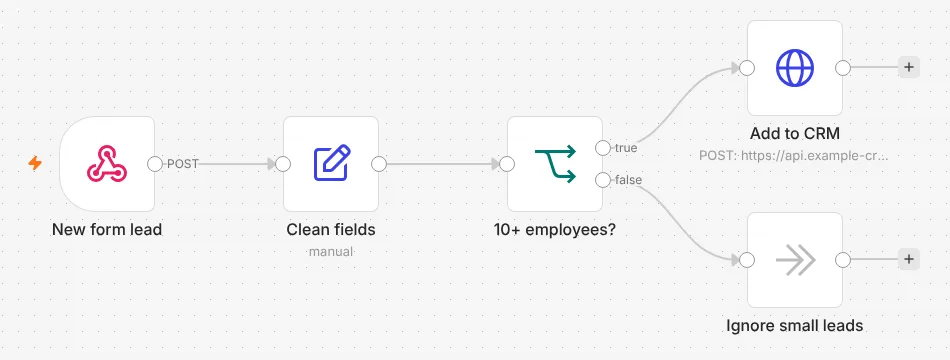
| Monthly volume | Make usage | n8n usage |
|---|---|---|
| 1,000 leads | about 4,000 credits (fits Core, 10,000 credits) | 1,000 executions (fits Starter, 2,500) |
| 2,000 leads | about 8,000 credits (still fits Core) | 2,000 executions (still fits Starter) |
| 5,000 leads | about 20,000 credits (needs a larger credit tier) | 5,000 executions (needs Pro, 10,000) |
| Same 5,000 leads with 12 steps instead of 4 | about 60,000 credits | still 5,000 executions |
For short workflows at low volume, Make is cheaper: Core starts at about half the price of n8n Starter and includes generous credits. As workflows get longer, Make’s cost grows with every step you add, while n8n’s does not. Self-hosting n8n removes the execution limit entirely; you pay only for the server, from about $6.50 a month. Our guide to self-hosting n8n with Docker walks through it, and the automation cost calculator lets you try your own numbers.
Ease of use
Make is easier to start with. Its editor shows each module as a circle with clear data mapping, and most popular apps have ready-made modules with every field laid out. Someone without a technical background can build a useful scenario in an afternoon.
n8n has a similar node-based canvas, but it expects you to be comfortable with data structures. You will see JSON, write small expressions such as {{ $json.email }}, and sometimes use the HTTP Request node where Make would have a dedicated module. In exchange, n8n shows the input and output of every node side by side, which makes debugging faster once you know your way around.
Integrations
Make has the larger library of ready-made app modules, and for mainstream SaaS tools it usually has deeper coverage. n8n covers the popular apps too, and anything with an API can be reached through its HTTP Request node, with community nodes filling many gaps on self-hosted installs. If your workflow depends on a niche app, check that app in both libraries before choosing.
AI and agents
Both tools now have AI features. n8n has built-in AI Agent nodes based on LangChain, with memory, tools and support for most major model providers, including models you run yourself. You pay the model provider directly, so costs stay transparent. Make offers AI modules and its own AI agents, and AI actions through Make’s built-in provider can use extra credits. For teams building serious agent workflows, n8n gives more control; for adding a quick AI step to an existing scenario, Make is simpler.
Hosting, data and security
n8n can run on your own server, so customer data never has to leave your infrastructure. That matters for agencies with strict clients, for regulated industries, and for anyone who wants to avoid usage-based bills. Make is cloud only, with data hosted in its EU or US regions. That is simpler, since there is nothing to maintain, but you depend on Make’s limits and pricing.
Strengths and weaknesses
n8n
Strengths
- Billed per full run, so long workflows stay cheap
- Free to self-host with no execution limit
- Code nodes in JavaScript and Python
- Strong AI agent tooling
Weaknesses
- Steeper learning curve
- Fewer ready-made app modules
- Self-hosting means you handle updates and backups
Make
Strengths
- Easiest visual builder of the two
- Large library of ready-made app modules
- Cheap entry plan with 10,000 credits
- Nothing to host or maintain
Weaknesses
- Every step uses credits, so costs grow with complexity
- No self-hosting
- Scenarios stop when credits run out
When Make is the better choice
Choose Make if the people building automations are not developers, if your workflows are short and connect well-known apps, and if your volume is modest. A marketing team syncing form leads to a CRM and posting alerts to Slack will be productive in Make faster, and the Core plan will likely cover them.
When n8n is the better choice
Choose n8n if your workflows have many steps or loops, run thousands of times a month, call AI models, or handle data you would rather keep on your own server. Agencies that run automations for many clients often end up on self-hosted n8n because one server can carry a large volume for a fixed price.
Try n8n Cloud Try Make freeFrequently asked questions
Is n8n free?
The self-hosted Community Edition is free to use; you pay only for the server. n8n Cloud, where n8n hosts it for you, is a paid service with a free trial.
Can I move my scenarios from Make to n8n?
There is no one-click import. You rebuild each scenario as a workflow. Simple scenarios take minutes; complex ones with many routes take longer. Many teams move their highest-volume scenarios first, since those save the most money.
Which is better for beginners?
Make. Its editor and app modules hide more of the technical detail. Many people start on Make and move to n8n as their workflows grow.
Which is cheaper?
For short, low-volume workflows, Make is usually cheaper. For long workflows or high volume, n8n is usually cheaper, and self-hosted n8n is cheapest of all.
Sources: n8n pricing and execution FAQ, Make pricing and credits, n8n self-hosting documentation.
Get the free workflow template pack
Tested n8n workflows you can import in one click, plus a short email when new templates and comparisons go live.