Best Zapier alternatives for agencies (2026): costs compared
By TestedFlows · Published October 16, 2026 · Prices checked October 16, 2026
This page contains affiliate links. If you sign up through them we may earn a commission, at no extra cost to you. How we make money.
Why agencies leave Zapier
Zapier is the easiest automation tool to start with, but agencies run into three problems as they grow.
Cost grows with every step. Zapier charges a task for each action step that runs. A client workflow with four actions uses four tasks every time it fires, so 2,000 runs a month needs the 10,000-task tier at $193.50/month (checked Oct 16, 2026) on monthly billing. Multiply that across ten clients and automation becomes one of your largest software bills.
Clients are hard to separate. Agencies need each client’s workflows, credentials and usage kept apart, ideally in a space the client can own if they leave.
Data control. Some clients, especially in healthcare, finance or the EU, do not want their customer data passing through another US cloud service.
What it costs: the same workflow on each tool
We priced one typical client workflow, a trigger plus four actions, run 2,000 times a month, at each tool’s current list prices:
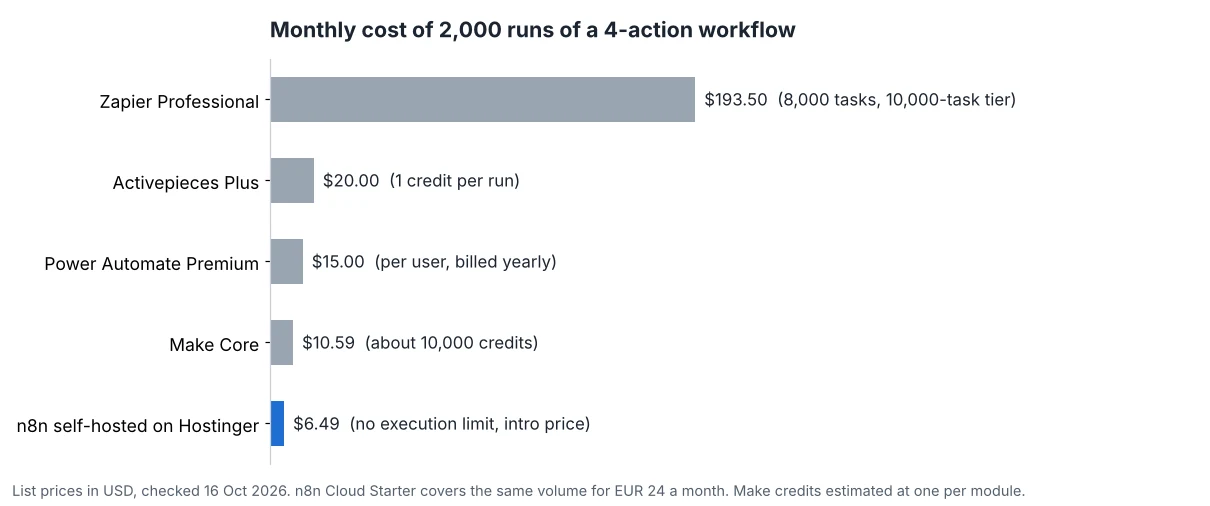
The gap comes from how each tool counts usage. Zapier counts every action. Make counts roughly every module, but its credits are much cheaper. n8n and Activepieces count each full run once, however many steps it has, and both can be self-hosted. Try your own volumes in the automation cost calculator.
Quick comparison
| n8n | Make | Activepieces | Power Automate | Zapier | |
|---|---|---|---|---|---|
| Usage counted per | Workflow run | Module action (credit) | Run (AI steps cost more) | User or bot licence | Action step (task) |
| Entry paid plan | €24/month (2,500 runs) (checked Oct 16, 2026) | $10.59/month (10,000 credits) (checked Oct 16, 2026) | $20/month (10,000 credits) (checked Oct 16, 2026) | $15/user/month, billed yearly (checked Oct 16, 2026) | $29.99/month (750 tasks) (checked Oct 16, 2026) |
| Self-hosting | Yes, free Community Edition | No | Yes | No | No |
| Best for | Technical agencies, high volume, AI | Visual builders, short workflows | Simple flows, open source | Microsoft 365 clients | Fastest setup, niche apps |
1. n8n: best overall for agencies
n8n is a workflow automation platform with a visual canvas, code nodes in JavaScript and Python, and built-in AI agent nodes. Its key advantage for agencies is pricing: one execution is one full run, whatever the number of steps, and the self-hosted Community Edition has no execution limit at all.
How agencies use it. Many agencies run one self-hosted instance per client, or one larger server for several small clients. A server with 4 GB of RAM costs from about $6.49/month (checked Oct 16, 2026) on Hostinger’s n8n plans. Workflows export as JSON files, so you can build a library of templates and reuse them across clients.
Licensing note. n8n’s Sustainable Use License allows using n8n for your own business purposes, which covers building and running workflows for clients. Selling access to n8n itself, such as a white-labelled hosted n8n, needs a commercial agreement. Read the license or ask n8n if your model is close to that line.
Strengths
- Per-run pricing keeps long workflows cheap
- Free self-hosting with no execution limit
- Strong AI agent and code support
- Workflows are portable JSON files
Weaknesses
- Steeper learning curve than Zapier
- Team features like projects and SSO need a paid plan when self-hosted
- You maintain self-hosted servers
Read more: n8n vs Zapier, n8n pricing explained, and n8n Cloud vs self-hosted.
Try n8n Cloud free2. Make: best for visual, non-technical teams
Make has the most approachable visual editor of the group and a large library of ready-made app modules. Its credits are cheap: the Core plan includes 10,000 credits for $10.59/month (checked Oct 16, 2026) on monthly billing, and the Teams plan adds team roles and shared templates.
The trade-off is that nearly every module uses a credit, so long or looping scenarios burn through credits quickly, and when credits run out, scenarios stop. Make is also cloud only. It suits agencies whose builders are marketers or operations staff rather than developers.
Strengths
- Easiest visual builder of the alternatives
- Cheap entry plan with generous credits
- Large library of app modules
Weaknesses
- Credits per module add up on complex scenarios
- No self-hosting
- Scenarios stop when credits run out
Read more: n8n vs Make.
Try Make free3. Activepieces: simple and open source
Activepieces is a newer open-source automation tool with a clean, Zapier-like editor. It counts one credit per run regardless of steps, with AI steps costing more unless you bring your own AI keys. The free plan includes 1,000 credits, Plus is $20/month for 10,000 credits (checked Oct 16, 2026), and Team is $200/month for 50,000 credits (checked Oct 16, 2026) with 25 users and SSO. It can also be self-hosted.
Its library of integrations is smaller and younger than Make’s or n8n’s, so check that your clients’ key apps are covered. It is a good fit for agencies that want Zapier’s simplicity with per-run pricing.
Strengths
- Simple editor, quick to learn
- One credit per run
- Open source and self-hostable
Weaknesses
- Smaller integration library
- Advanced features cost more than n8n's
- Younger ecosystem and community
4. Microsoft Power Automate: for Microsoft 365 clients
If your clients run on Outlook, Teams, SharePoint and Excel, Power Automate connects to them natively. It is licensed per user rather than per task: Premium is $15/user/month, billed yearly (checked Oct 16, 2026), and unattended bots for desktop automation cost more per bot.
Per-user licensing works well inside one client’s company but is awkward for an agency running automations for many clients. Its connectors outside the Microsoft world are also more limited.
Strengths
- Deep Microsoft 365 integration
- Predictable per-user pricing
- Desktop automation (RPA) available
Weaknesses
- Per-user licences fit agencies poorly
- Weaker outside the Microsoft ecosystem
- Licensing is complex
When to stay on Zapier
Zapier is still the right choice in some cases. If your clients’ workflows are short (one action plus filters, which use no tasks), volume is low, or a client depends on a niche app that only Zapier supports, switching may not be worth the effort. Count the actual action steps in your Zaps before deciding.
How to choose
| Your agency | Best pick |
|---|---|
| Developers on the team, high volume or AI work | n8n, self-hosted or Cloud |
| Non-technical builders, short workflows | Make |
| Want Zapier’s simplicity with per-run pricing | Activepieces |
| Clients standardised on Microsoft 365 | Power Automate |
| Low volume, niche apps, no time to migrate | Stay on Zapier |
How to migrate client workflows from Zapier
- List every Zap with its trigger, actions and monthly task usage. Start with the Zaps that use the most tasks; they save the most money.
- Rebuild, don’t import. None of these tools imports Zaps directly. Rebuild each one, which is also a chance to combine several Zaps into one workflow.
- Run both in parallel for a few days and compare results before switching off the Zap.
- Move webhooks last. Update forms and apps that call Zapier webhooks to the new URLs only when the new workflow is tested.
- Document per client which workflows run where and which credentials they use, so handovers stay simple.
Frequently asked questions
What is the cheapest alternative to Zapier?
Self-hosted n8n is the cheapest at any real volume, since you pay only for the server and executions are unlimited. Among cloud plans, Make Core has the lowest entry price.
Is there a free Zapier alternative?
Yes. n8n and Activepieces are free to self-host, and Make and Activepieces have free cloud plans with monthly limits.
Which Zapier alternative is best for white-label client portals?
Activepieces sells an embed product for putting its builder inside your own product, and n8n offers embedding through a commercial licence. Both are priced for software companies rather than small agencies, so contact sales for terms.
Can I use n8n for client work?
Yes. Building and running workflows for clients is generally allowed under n8n’s Sustainable Use License. Charging clients for access to n8n itself, as a hosted product, needs a commercial agreement with n8n.
Sources: Zapier pricing, Make pricing, n8n pricing, Activepieces pricing, Power Automate pricing, n8n Sustainable Use License.
Get the free workflow template pack
Tested n8n workflows you can import in one click, plus a short email when new templates and comparisons go live.