n8n webhook not working? 12 real errors and how to fix them
By the TestedFlows team · Published October 28, 2026
Tested on n8n 2.43.5 · 27 October 2026
This page contains affiliate links. If you sign up through them we may earn a commission, at no extra cost to you. How we make money.
When an n8n webhook fails, the error message usually tells you exactly what is wrong, but only if you know how to read it. We reproduced every common webhook failure on a self-hosted n8n 2.43.5 instance on 27 October 2026, sent real requests with curl, and recorded the exact responses. Each section below shows the message you will see, why it happens and how to fix it.
Find your error
| What you see | Cause | Fix |
|---|---|---|
404 “The requested webhook “orders” is not registered.” with a hint to click Execute workflow |
Test URL called while n8n is not listening | Section 1 |
404 “The requested webhook “POST orders” is not registered.” with a hint that the workflow must be active |
Production URL of an unpublished workflow | Section 2 |
404 “This webhook is not registered for GET requests. Did you mean to make a POST request?” |
Wrong HTTP method | Section 3 |
404 for a path you are sure exists |
Typo or different path | Section 4 |
Webhook URL starts with http://localhost:5678 |
Webhook URL setting missing | Section 5 |
| Workflow is published but never runs | Another workflow uses the same path | Section 6 |
403 “Authorization data is wrong!” |
Missing or wrong authentication header | Section 7 |
500 “No Respond to Webhook node found in the workflow” |
Respond setting expects a node that is missing | Section 8 |
Caller gets {"message":"Workflow was started"} instead of data |
Respond is set to Immediately | Section 9 |
500 “Error in workflow” |
A node after the webhook failed | Section 10 |
500 “There was a problem executing the workflow” on large requests |
Request body over 16 MB | Section 11 |
| CORS error in the browser console | Usually a hidden 404, not a CORS setting | Section 12 |
524 from Cloudflare after about 100 seconds |
Workflow takes too long to respond | Timeouts |
Test URL vs production URL: the cause of most problems
Every Webhook node has two URLs, shown under Webhook URLs when you open the node:
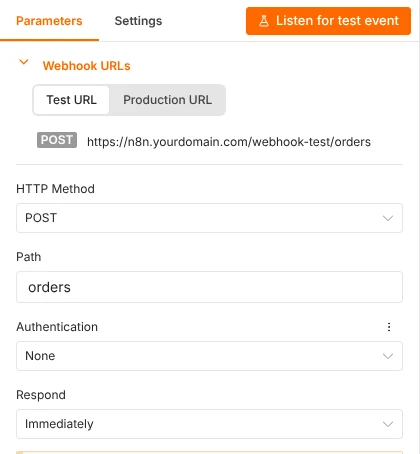
- The Test URL contains
/webhook-test/. It only works while you are building: after you click Execute workflow or Listen for test event, it accepts one request, shows the data on the canvas, and stops listening. - The Production URL contains
/webhook/. It only works once the workflow is published (the Publish button at the top right in n8n 2.x). Its runs do not appear on the canvas; you find them under Executions.
Use the test URL while building, then switch the calling app to the production URL and publish the workflow. Forgetting that switch is the single most common reason a webhook “stops working” after testing.
1. Test URL: the webhook is not registered
404 {"code":404,"message":"The requested webhook \"orders\" is not registered.",
"hint":"Click the 'Execute workflow' button on the canvas, then try again.
(In test mode, the webhook only works for one call after you click this button)"}
Cause: you called the test URL while n8n was not listening for a test event. This also happens on the second request after you click Execute workflow: in our test, the first request returned 200 and the very next one returned this 404.
Fix: click Execute workflow (or Listen for test event inside the node), wait until the node shows “Waiting for you to call the Test URL”, then send one request:
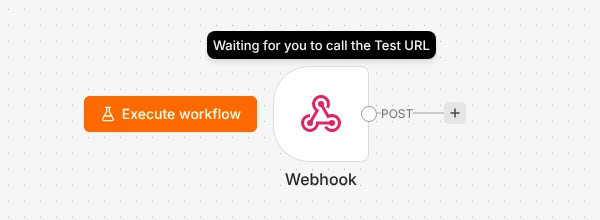
To send test data repeatedly, click Execute workflow before each request, or publish the workflow and use the production URL.
2. Production URL: the workflow is not published
404 {"code":404,"message":"The requested webhook \"POST orders\" is not registered.",
"hint":"The workflow must be active for a production URL to run successfully. ..."}
Cause: the workflow is not published, so its production URL does not exist yet. Note the method in the message (POST orders), which the test-mode message does not include.
Fix: click Publish. In our test, the production URL started answering within a second or two of publishing; a request sent in the same instant still got this 404. If you just published, wait a moment and retry.
3. Wrong HTTP method
404 {"code":404,"message":"This webhook is not registered for GET requests.
Did you mean to make a POST request?"}
Cause: the Webhook node accepts one method (POST in this example) and the request used another. Opening a webhook URL in your browser’s address bar always sends GET, so this is what you see when you “test” a POST webhook that way.
Fix: send the method the node expects, or change HTTP Method in the node. To test a POST webhook without another app:
curl -X POST https://n8n.yourdomain.com/webhook/orders \
  -H "Content-Type: application/json" \
  -d '{"order": 1042, "email": "sam@example.com"}'
4. Wrong path
404 {"code":404,"message":"The requested webhook \"POST lead\" is not registered."}Cause: the path in the request does not match the node. In our test, the node’s path was leads and the request used lead. The same error appears if the calling app still has an old path after you renamed it in n8n.
Fix: copy the full production URL from the node rather than typing it, and paste it into the calling app again after any change to the path.
5. The webhook URL shows localhost
If the node shows http://localhost:5678/webhook/..., outside services cannot reach it. We started a fresh n8n instance with no webhook URL setting, and both its test and production webhook URLs began with http://localhost and the port.
Fix: tell n8n its public address. In Docker Compose, add this to the n8n service’s environment section, then run docker compose up -d:
- N8N_WEBHOOK_URL=https://n8n.yourdomain.com/Older guides and some one-click templates use WEBHOOK_URL instead. It still works in n8n 2.43.5, but n8n now logs this warning at startup:
There are deprecations related to your n8n setup.
 - WEBHOOK_URL -> Use N8N_WEBHOOK_URL instead, which sets the base URL
   for both test and production webhooks.
If your instance uses WEBHOOK_URL, rename it to N8N_WEBHOOK_URL the next time you edit the file. When both are set, N8N_WEBHOOK_URL wins. Our Docker self-hosting guide already uses the new name.
6. Two workflows use the same path
Symptom: the workflow shows as published, but requests never start it and its Executions list stays empty.
Cause: another published workflow already uses the same path and method. In our test we published two workflows with the path leads. Both showed as published, but every request ran the first one; the second had zero executions. The only sign of the problem was this line in the n8n log:
The URL path that the "Webhook" node uses is already taken. Please change it to something else.This often happens after duplicating a workflow, which copies the path.
Fix: give every Webhook node a unique path. On self-hosted n8n, check the log with docker compose logs n8n | grep "already taken".
7. 403 Authorization data is wrong!
403 Authorization data is wrong!Cause: the Webhook node has Authentication set (Basic Auth, Header Auth or JWT Auth) and the request did not send matching credentials. We got this 403 both with no header and with a wrong value; the correct header returned 200.
Fix: check the exact header name and value stored in the node’s credential. With Header Auth, test it like this:
curl -X POST https://n8n.yourdomain.com/webhook/secure-lead \
  -H "X-Webhook-Secret: your-secret-value" \
  -H "Content-Type: application/json" -d '{}'
Authentication is worth keeping on any webhook that starts important actions; see our n8n security checklist.
8. No Respond to Webhook node found
500 {"code":0,"message":"No Respond to Webhook node found in the workflow"}Cause: the Webhook node’s Respond setting is “Using ‘Respond to Webhook’ Node”, but the workflow has no Respond to Webhook node, or the run never reaches it (for example, an IF node sends the data down a branch without one).
Fix: add a Respond to Webhook node at the end of every branch the data can take, or change Respond to Immediately or When Last Node Finishes.
9. The caller gets “Workflow was started” instead of data
200 {"message":"Workflow was started"}Cause: this is not an error. With Respond set to Immediately (the default), n8n answers as soon as the request arrives, before the workflow runs, so the caller never sees your workflow’s output.
Fix: if the calling app needs data back, set Respond to When Last Node Finishes, or use a Respond to Webhook node to choose exactly what to return. Keep Immediately for fire-and-forget events such as form submissions and payment notifications.
10. 500 Error in workflow
500 {"message":"Error in workflow"}Cause: with Respond set to When Last Node Finishes, a node after the webhook failed. In our test, a Code node threw an error, and the caller received only this generic message.
Fix: open Executions for the workflow, click the failed run and look at the node marked in red; it shows the real error. Then decide what the caller should receive when something fails: in the risky node’s Settings, set On Error to Continue (using error output) and connect that error output to a Respond to Webhook node with a clear message.
11. Large requests fail
500 {"code":0,"message":"There was a problem executing the workflow"}Cause: we sent a 17 MB JSON body and got this response. The n8n log showed the real reason: PayloadTooLargeError: request entity too large. n8n accepts request bodies up to 16 MB by default.
Fix: raise the limit with N8N_PAYLOAD_SIZE_MAX (in MB), for example N8N_PAYLOAD_SIZE_MAX=64. File uploads sent as multipart form data have a separate limit of 200 MB, set with N8N_FORMDATA_FILE_SIZE_MAX. If you run Nginx in front of n8n, it has its own limit (client_max_body_size, 1 MB by default) and returns 413 Request Entity Too Large before n8n sees the request. Large bodies also use more memory; see how much RAM n8n needs.
12. CORS errors in the browser
If you call a webhook from JavaScript on a website and the browser console shows a CORS error, check the webhook itself before changing any CORS setting.
In our test, a published webhook with default settings answered requests from any website, returning Access-Control-Allow-Origin with the caller’s origin. But when we called a path that was not registered, n8n answered with an HTML error page, status 500, and no Access-Control-Allow-Origin header. The browser then reports a CORS error and hides the real problem, which is the unregistered webhook from sections 1 to 4.
Fix: send the same request with curl (sections 3 and 7). If it returns a 404 “not registered” message, fix that first. If the webhook works with curl but not in the browser, open the Webhook node’s Options, add Allowed Origins (CORS) and check that it lists your site, or is *.
Timeouts behind Cloudflare or a proxy
With Respond set to When Last Node Finishes, the caller waits for the whole workflow. If n8n sits behind Cloudflare’s proxy (orange cloud), Cloudflare closes the request with a 524 error when the server does not respond within 100 seconds, even though the workflow keeps running in n8n. Other proxies and the calling app may have shorter limits.
Fix: for workflows that can take longer than a few seconds, set Respond to Immediately and send the result somewhere else when it is ready (an email, a Slack message or a second webhook call). Long AI steps are the usual reason a workflow crosses this limit.
A quick checklist before you ask for help
- Is the workflow published, and are you calling the production URL (
/webhook/)? - Does the URL start with your public https address, not localhost?
- Do the method and path match the node exactly?
- Does
curlto the same URL work? If yes, the problem is in the calling app. - Is there anything in Executions? If a run exists, the webhook worked and the problem is in a later node.
- On self-hosted n8n, does
docker compose logs n8n --tail=50show an error?
New to self-hosting? Start with our Docker guide, or skip the server work entirely with n8n Cloud, where webhook URLs are set up for you.
Try n8n Cloud freeFrequently asked questions
Why does my n8n webhook work in testing but not in production?
You are probably still calling the test URL (/webhook-test/), which works only once after you click Execute workflow, or the workflow is not published. Switch the calling app to the production URL (/webhook/) and click Publish.
Why don’t I see production webhook data on the canvas?
Production runs are not shown on the canvas. Open the workflow’s Executions tab to see each run and its data.
How do I test an n8n webhook without another app?
Use curl from a terminal, as shown in section 3, or a tool such as Postman. For a quick GET test, set the node’s method to GET and open the URL in your browser.
Can two workflows share a webhook path?
Not with the same method. Each method and path combination can belong to only one published workflow; the second one silently receives nothing, as section 6 shows.
What is the maximum request size for an n8n webhook?
16 MB for the request body by default, adjustable with N8N_PAYLOAD_SIZE_MAX, and 200 MB for files sent as form data, adjustable with N8N_FORMDATA_FILE_SIZE_MAX. A reverse proxy in front of n8n may set a lower limit.
How we tested: we ran self-hosted n8n 2.43.5 on 27 October 2026, built each failing setup on purpose, and called the webhooks with curl. Every error message above was copied from those responses or from the n8n log. On n8n Cloud the messages are the same, except that you cannot view the server log.
Sources: n8n Webhook node documentation, n8n Webhook node common issues, n8n Docker installation, Cloudflare error 524, Nginx client_max_body_size.
Get the free workflow template pack
Tested n8n workflows you can import in one click, plus a short email when new templates and comparisons go live.