n8n "Connection lost" behind Nginx: tested causes and config
By the TestedFlows team · Published November 9, 2026
Tested on n8n 2.43.5 · 8 November 2026
This page contains affiliate links. If you sign up through them we may earn a commission, at no extra cost to you. How we make money.
This error appears when you put self-hosted n8n behind your own Nginx reverse proxy: the editor loads and you can log in, but a “Connection lost” warning appears and test runs never finish. We reproduced it on n8n 2.43.5 behind Nginx 1.24 on 8 November 2026, with each common config mistake in turn, and recorded what n8n, Nginx and the browser reported. Every log line below is from those tests.
What the error looks like
In our tests the editor showed a Connection lost warning at the top right. Clicking Execute workflow produced a Problem running workflow: Lost connection to the server message, and the button kept spinning:
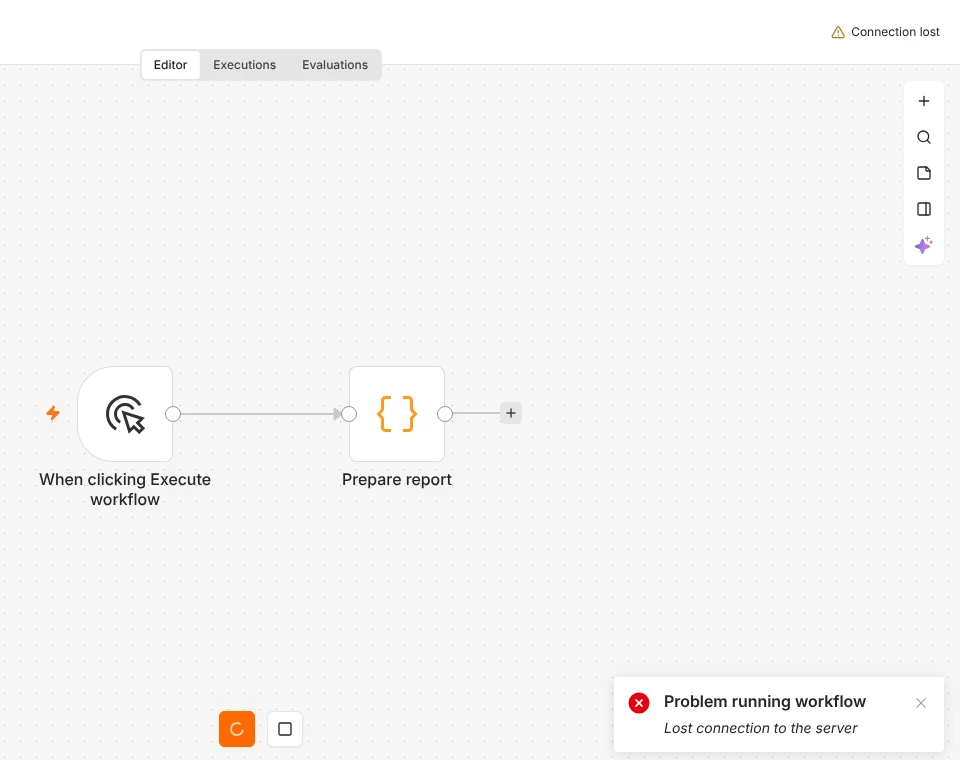
Two things are worth knowing straight away:
- Published workflows keep running. Webhooks, schedules and other production triggers do not use the editor’s live connection. In our tests, webhook calls through the same broken Nginx config worked normally.
- Test runs from the editor do not start. In both broken setups, clicking Execute workflow left no execution in the Executions list at all.
Why n8n needs a live connection
The editor keeps a permanent connection to the server at /rest/push. n8n uses it to send live updates: which node is running, test results, and changes made by colleagues. By default it is a WebSocket, which starts as a normal HTTP request and then “upgrades” to a two-way connection. Nginx only passes that upgrade on if it is told to. n8n pings each connection every 60 seconds to keep it alive.
Cause 1: Nginx does not pass the WebSocket upgrade
The most common minimal config forwards ordinary requests but not WebSockets:
location / {
    proxy_pass http://127.0.0.1:5678;
    proxy_set_header Host $host;
}
What we saw: the editor loaded, but every attempt to open the live connection failed. The browser’s developer console (F12) showed:
WebSocket connection to 'ws://localhost/rest/push?pushRef=...' failed
[WebSocketClient] Connection lost, code=1006
[WebSocketClient] Attempting to reconnect in 1000ms
The editor retried after 1, 2, 4 and 8 seconds, failing each time. The Nginx access log showed the push requests answered with 401 instead of 101 (the code for a successful WebSocket upgrade):
"GET /rest/push?pushRef=... HTTP/1.1" 401Fix: add these three lines to the location block:
proxy_http_version 1.1;
proxy_set_header Upgrade $http_upgrade;
proxy_set_header Connection "upgrade";
Cause 2: the Host header is missing (Invalid origin)
The opposite mistake: the WebSocket lines are there, but the Host header is not passed on:
location / {
    proxy_pass http://127.0.0.1:5678;
    proxy_http_version 1.1;
    proxy_set_header Upgrade $http_upgrade;
    proxy_set_header Connection "upgrade";
}
What we saw: the WebSocket connected, then n8n closed it straight away. The browser console showed a different code, and the editor reconnected every second without success:
[WebSocketClient] Connection lost, code=1008
[WebSocketClient] Attempting to reconnect in 1000ms
The n8n log explained why:
Origin header does NOT match the expected origin.
(Origin: "http://localhost" -> "localhost",
 Expected: "127.0.0.1:5690" -> "127.0.0.1:5690", Protocol: "http")
Our test instance listened on port 5690; on a standard setup you would see 127.0.0.1:5678 here.
Cause: as a security check, n8n compares the address in your browser (the Origin) with the address the request was sent to (the Host, or X-Forwarded-Host if set). Without proxy_set_header Host $host, Nginx sends its own upstream address, such as 127.0.0.1:5678, so the two never match. n8n runs this check in production mode, which is how the official Docker image runs. That is why the same config can work in a quick local test and fail on a real server.
Fix: add:
proxy_set_header Host $host;
proxy_set_header X-Forwarded-Proto $scheme;
If you see this log line with a different hostname, for example after a second proxy such as a load balancer, make sure the outer proxy also passes the original host on, in Host or X-Forwarded-Host.
Not a cause: Nginx’s 60-second timeout and the editor
Many guides tell you to raise proxy_read_timeout to fix “Connection lost”. In our test, with Nginx’s default 60-second timeout and the correct headers, the editor’s connection stayed open for over three minutes without a single reconnect, because n8n’s 60-second pings keep it active.
The timeout does matter for something else: slow webhooks. We published a workflow whose webhook responds When Last Node Finishes and whose Code node takes 70 seconds. Through Nginx with the default timeout, the caller got this after exactly 60 seconds:
504 Gateway Time-outThe workflow itself still finished successfully in n8n; only the response was lost. With proxy_read_timeout 3600s; the same call returned 200 {"done":true} after 70 seconds. If you use Cloudflare’s proxy as well, it has its own limit of 100 seconds; see our webhook troubleshooting guide.
The Nginx config that worked
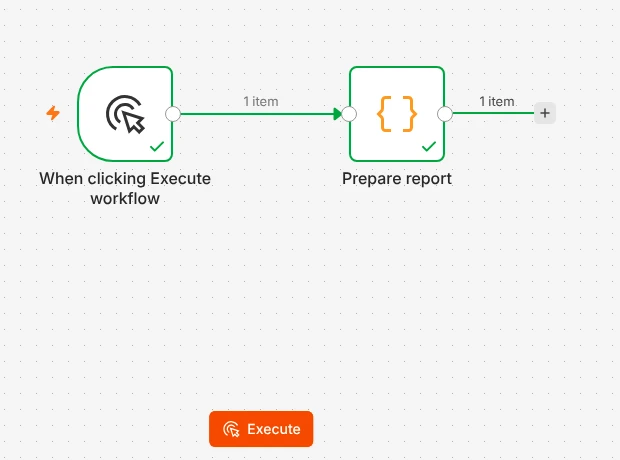
With this location block, the editor connected, test runs completed and updated live, and the slow webhook returned normally:
location / {
    proxy_pass http://127.0.0.1:5678;
    proxy_http_version 1.1;
    proxy_set_header Upgrade $http_upgrade;
    proxy_set_header Connection "upgrade";
    proxy_set_header Host $host;
    proxy_set_header X-Real-IP $remote_addr;
    proxy_set_header X-Forwarded-For $proxy_add_x_forwarded_for;
    proxy_set_header X-Forwarded-Proto $scheme;
    proxy_buffering off;
    proxy_read_timeout 3600s;
}
Put it inside your server block for your n8n domain (the one with your HTTPS certificate), then check and reload Nginx:
sudo nginx -t
sudo systemctl reload nginx
Reload the n8n editor in your browser afterwards. Also make sure n8n knows its public address, with N8N_WEBHOOK_URL=https://n8n.yourdomain.com/ (see section 5 of our webhook guide).
Can’t change the proxy? Switch n8n to SSE
Some setups use a proxy you cannot configure, or one that does not support WebSockets. n8n can use Server-Sent Events (SSE) for the live connection instead, which is a plain long-running HTTP request. Add this to n8n’s environment and restart:
- N8N_PUSH_BACKEND=sseWhat we saw: with SSE enabled, the editor worked through the minimal Nginx config from cause 1, with no WebSocket lines at all: the push request returned 200, and a test run completed and updated live. Keep the Host line anyway, because n8n checks the origin of SSE connections too.
Other proxies
- Caddy and Traefik pass WebSockets through by default. The setups in our Docker guide, DigitalOcean guide and Hostinger guide use them and do not need extra settings.
- Nginx Proxy Manager: open the proxy host and turn on Websockets Support.
- Cloudflare: WebSockets are allowed on all plans. If the error started after enabling Cloudflare’s proxy, check the Nginx config behind it first.
Quick diagnosis
- Open the browser’s developer tools (F12), Console tab, and reload the editor.
code=1006with “WebSocket connection … failed”: the upgrade headers are missing (cause 1).code=1008: n8n rejected the origin; checkHost(cause 2) and the n8n log for “Origin header does NOT match”.- No WebSocket messages, but
504errors from webhooks after exactly 60 seconds: raiseproxy_read_timeout. - Check the Nginx access log for
/rest/push:101means the WebSocket connected;401means the upgrade never reached n8n.
Frequently asked questions
Does “Connection lost” stop my workflows from running?
No. Published workflows run on the server and do not depend on the editor’s connection. In our tests, webhook calls worked while the editor showed Connection lost. Only test runs from the editor were affected.
Why does it work on localhost but not behind my domain?
n8n’s origin check runs in production mode, which the Docker image uses. Locally you may not be in production mode, or there is no proxy changing the Host header. Behind Nginx without proxy_set_header Host $host, the check fails.
Should I use WebSocket or SSE?
Use the default WebSocket if you can configure your proxy as shown above. Switch to N8N_PUSH_BACKEND=sse when the proxy cannot pass WebSockets. Both worked in our tests.
Is a long proxy_read_timeout safe?
Yes. It only lets slow responses finish instead of cutting them off at 60 seconds. It does not slow anything down.
How we tested: on 8 November 2026 we ran n8n 2.43.5 in production mode behind Nginx 1.24, opened the editor in Chromium through each Nginx config in turn, ran a test workflow, kept the editor open for over three minutes, and called a 70-second webhook. Browser console messages, Nginx access logs and n8n logs above are copied from those runs.
Sources: n8n deployment environment variables, Nginx WebSocket proxying, Nginx proxy_read_timeout.
Get the free workflow template pack
Tested n8n workflows you can import in one click, plus a short email when new templates and comparisons go live.