n8n Code node errors: 14 real messages and how to fix them
By the TestedFlows team · Published October 31, 2026
Tested on n8n 2.43.5 · 30 October 2026
This page contains affiliate links. If you sign up through them we may earn a commission, at no extra cost to you. How we make money.
The Code node is where n8n workflows most often break, and its error messages are short. We triggered every common Code node error on purpose on a self-hosted n8n 2.43.5 instance on 30 October 2026, with default settings and the JavaScript task runner that n8n 2.x uses, and recorded the exact message for each one. Every message below was copied from those runs.
Find your error
| Error message | Section |
|---|---|
| Code doesn’t return items properly | 1 |
| In the returned data, every key named ‘json’ must point to an object. | 2 |
| Can’t use .all() here [line 1, for item 0] | 3 |
| Cannot read properties of undefined (reading ‘email’) [line 2] | 4 |
| Referenced node doesn’t exist | 5 |
| Module ‘axios’ is disallowed [line 1] | 6 |
| Module ‘crypto’ is disallowed [line 1] | 6 |
| access to env vars denied | 7 |
| process is not defined [line 1] | 7 |
| fetch is not defined [line 1] | 8 |
| moment is not defined [line 1] | 9 |
| Unexpected token ‘]’ | 10 |
| Task execution timed out after … seconds | 11 |
| Node ran out of memory | 12 |
| Python runner unavailable | 13 |
| Your own message, such as Customer email is missing [line 1] | 14 |
First, check the mode
Every Code node runs in one of two modes, set at the top of the node:
- Run Once for All Items (the default): your code runs once and receives every item. Use
$input.all()and return an array of items. - Run Once for Each Item: your code runs once per item. Use
$input.itemor$json, and return one item.
Half of the errors below come from writing code for one mode while the node is set to the other.
1. Code doesn’t return items properly
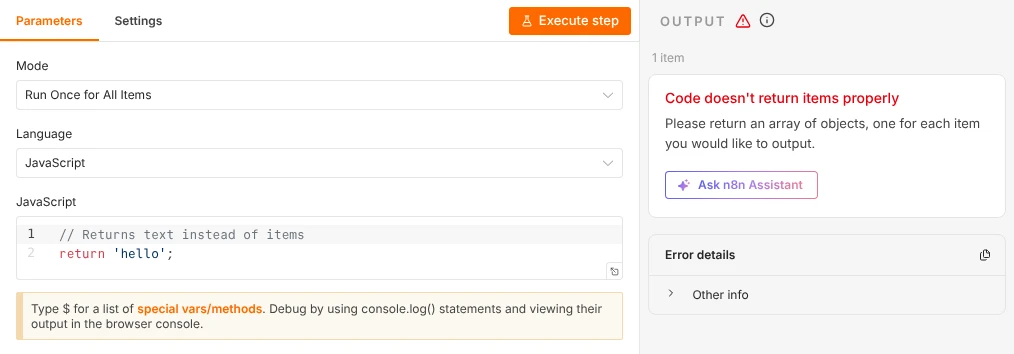
Code doesn't return items properly
Please return an array of objects, one for each item you would like to output.
Cause: in “Run Once for All Items” mode, the code returned something that is not a list of objects. We got this message for return 'hello'; and for return [1, 2, 3];.
Fix: return an array of objects, each with a json key:
return [
  { json: { name: 'Sam', email: 'sam@example.com' } },
];
n8n is forgiving in two ways we confirmed: returning a single plain object such as return { total: 5 }; worked, and so did an array of plain objects without the json key. n8n wrapped them for us. Text, numbers and arrays of numbers do not work.
2. Every key named ‘json’ must point to an object
In the returned data, every key named 'json' must point to an object.Cause: this one is misleading. We got it in “Run Once for Each Item” mode when the code returned an array (return [{ json: { a: 1 } }];) and when it returned text. In this mode n8n expects exactly one item per run, not a list.
Fix: return a single object, without the square brackets:
return { json: { email: $input.item.json.body.email, checked: true } };A plain object such as return { email: $json.body.email }; also worked in our test. If you really want to return a list, switch the mode to “Run Once for All Items”.
3. Can’t use .all() here
Can't use .all() here [line 1, for item 0]Cause: the code calls $input.all() while the node is in “Run Once for Each Item” mode, where each run sees only one item.
Fix: either switch the mode to “Run Once for All Items”, or replace $input.all() with $input.item (or $json) and process one item at a time.
4. Cannot read properties of undefined
Cannot read properties of undefined (reading 'email') [line 2]Cause: the code reads a property of something that does not exist. In our test, the code read i.json.body.customer.email, but the incoming data had no customer object. The line number tells you where.
The most common version of this: data from a Webhook node sits under body. A form field called email is at $json.body.email, not $json.email. Open the input panel on the left of the Code node to see the real structure.
Fix: correct the path, or read it safely so a missing field gives null instead of an error:
return $input.all().map(item => ({
  json: { email: item.json.body?.customer?.email ?? null },
}));
5. Referenced node doesn’t exist
Referenced node doesn't existCause: the code uses $('Node name') with a name that no node in the workflow has. We referenced $('Lead form') in a workflow without it. This also happens after you rename a node, or when you paste code from another workflow.
Fix: the name must match exactly, including capitals and spaces. Type $( in the Code node and pick the node from the list instead of typing its name.
6. Module is disallowed
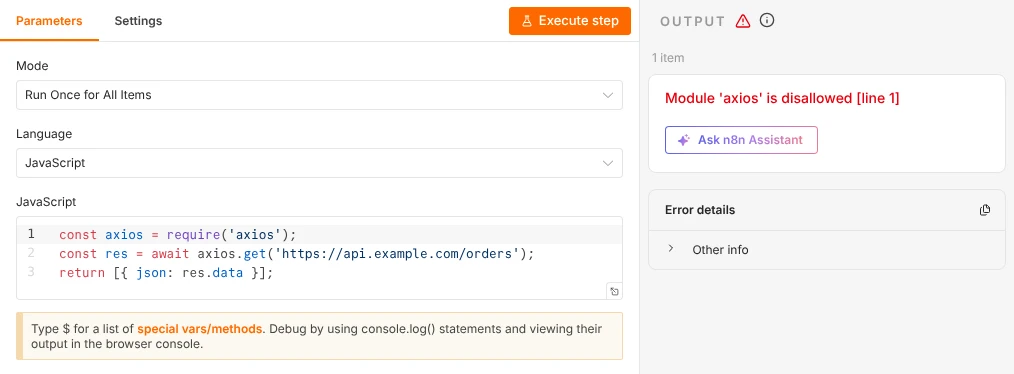
Module 'axios' is disallowed [line 1]
Module 'crypto' is disallowed [line 1]
Cause: by default, n8n’s Code node cannot load any module with require, neither npm packages like axios nor Node.js built-ins like crypto.
Fix, without modules: for API calls, use an HTTP Request node or this.helpers.httpRequest (section 8). Many common needs, such as dates with Luxon, are built in (section 9).
Fix, allowing modules (self-hosted only): list them in environment variables and restart n8n:
- NODE_FUNCTION_ALLOW_BUILTIN=crypto
- NODE_FUNCTION_ALLOW_EXTERNAL=axios
With those two lines on our test instance, require('crypto') and require('axios') both worked. You can list several modules separated by commas. An npm package must also be installed where the code runs: on Docker, n8n’s documentation says that means building a custom image that includes it. If you run task runners in external mode, set these variables on the runners container. Allow only what you need, because every module widens what workflow code can do on your server. According to n8n’s documentation, n8n Cloud does not support importing modules at all.
7. Access to env vars denied and process is not defined
access to env vars denied
process is not defined [line 1]
Cause: n8n 2.x blocks Code nodes from reading the server’s environment variables by default (N8N_BLOCK_ENV_ACCESS_IN_NODE=true), because they often hold passwords and API keys. We got the first message for $env.OPENAI_API_KEY. The process object is not available at all in the Code node’s sandbox.
Fix: keep secrets in n8n credentials and use them in nodes that support credentials, such as the HTTP Request node. That keeps keys out of your code and out of workflow exports. Setting N8N_BLOCK_ENV_ACCESS_IN_NODE=false brings $env back on self-hosted n8n, but it lets any workflow read every secret on the server, so our security checklist recommends keeping the default.
8. fetch is not defined
fetch is not defined [line 1]Cause: the browser-style fetch function is not available in the Code node.
Fix: use n8n’s built-in request helper, which worked in our test:
const data = await this.helpers.httpRequest({
  url: 'https://api.example.com/orders',
  json: true,
});
return [{ json: data }];
For anything that needs authentication, an HTTP Request node with a saved credential is usually better, because the key stays out of your code.
9. moment is not defined
moment is not defined [line 1]Cause: older tutorials use the moment date library, which is not built into the Code node.
Fix: use Luxon, which is built in as DateTime and worked in our test without any setup:
return [{ json: { now: DateTime.now().toISO() } }];Luxon uses n8n’s timezone setting, which is New York time unless you change it; see our Schedule Trigger guide for how to set it.
10. Unexpected token: syntax errors
Unexpected token ']'Cause: the JavaScript itself is invalid, so it never runs. Our test code had a missing closing brace: return [{ json: { total } ];. Unlike runtime errors, syntax errors in our test came without a line number.
Fix: look for unmatched brackets, braces and quotes. The Code node’s editor usually marks the problem before you run the workflow. Count that every { and [ has a partner.
11. Task execution timed out
Task execution timed out after 15 secondsCause: the code ran longer than the task runner allows, usually because of an endless loop or a very large job. We set the limit to 15 seconds to test it with while (true) {}. The default limit is 300 seconds (five minutes).
Fix: check loops for an exit condition, and split large jobs into batches with the Loop Over Items node. On self-hosted n8n you can change the limit with N8N_RUNNERS_TASK_TIMEOUT (in seconds). At startup, n8n 2.43.5 warns that this default will drop to 60 seconds in a future version, so long-running code may start failing after an update unless you set the value yourself.
12. Node ran out of memory
Node ran out of memory
This usually happens when there are too many items to process.
Cause: the code built more data than the task runner’s memory limit allows. We triggered it by creating tens of millions of objects in one run with a 256 MB limit. n8n restarted the task runner automatically afterwards.
Fix: process fewer items at a time with Loop Over Items, keep only the fields you need, and avoid copying large arrays. On self-hosted n8n you can raise the limit with N8N_RUNNERS_MAX_OLD_SPACE_SIZE (in MB), as long as the server has the RAM. Our VPS memory test shows how much n8n itself uses.
13. Python runner unavailable
Python runner unavailable: Virtual environment is missing from this system
Internal mode is intended only for debugging. For production, deploy in external mode
Cause: in n8n 2.x, Python Code nodes run in a separate Python task runner. Our test instance ran task runners in the default internal mode, which had no Python environment, so every Python Code node failed with this message. The reason in the first line can differ (for example, Python 3 itself is missing), but the fix is the same.
Fix: use JavaScript for Code nodes where you can, since it needs no extra setup. If you need Python, set up task runners in external mode as described in n8n’s task runner documentation.
14. Your own error message
Customer email is missing [line 1]This is not a bug: it is what n8n shows when your code calls throw new Error('Customer email is missing'). Throwing a clear error on purpose is good practice: the workflow stops, the run is marked as failed, and your message tells you exactly what was wrong. Pair it with an error workflow (Workflow settings, Error Workflow) so you hear about it.
How to debug a Code node
- Look at the input first. The left panel of the Code node shows exactly what data arrives, including whether fields sit under
body. - Use
console.log(). When you run the workflow from the editor, the output appears in your browser’s developer console (F12), as the hint under the editor says. - Return early. Temporarily put
return $input.all();near the top, run the node, and move it down line by line to find where the data changes. - Check the mode whenever the error mentions
.all(),.itemor the shape of returned data. - Read the line number in the message. Runtime errors in our tests always included one, such as
[line 2].
Errors that happen in nodes other than the Code node, such as webhook and schedule problems, are covered in our webhook troubleshooting guide and Schedule Trigger guide.
Try n8n Cloud freeFrequently asked questions
Can I use npm packages in the n8n Code node?
On self-hosted n8n, yes: list them in NODE_FUNCTION_ALLOW_EXTERNAL and make sure they are installed where the code runs. On n8n Cloud, no. In both, the HTTP Request node and the built-in this.helpers.httpRequest cover most of what people install axios for.
What libraries are built into the Code node?
In our test, Luxon (DateTime) and n8n’s helpers such as $input, $json, $('Node name') and this.helpers.httpRequest worked without any setup. moment, fetch and process were not available.
Why does my Code node work in testing but fail in production?
Usually because production data differs from your test data: a missing field (section 4) or more items than expected (sections 11 and 12). Open the failed run under Executions to see the exact input that caused the error.
How do I stop a workflow on purpose from a Code node?
Throw an error, as in section 14: throw new Error('Reason');. The run stops and is marked as failed, with your message.
Is the Code node safe on a shared n8n instance?
n8n 2.x runs Code nodes in a separate task runner process, blocks module loading and environment variable access by default, and limits running time and memory. Keep those defaults unless a workflow needs a specific exception.
How we tested: on 30 October 2026 we ran self-hosted n8n 2.43.5 with default settings, plus a second instance with modules allowed and lower time and memory limits, and ran each failing snippet through a webhook-started workflow. All messages above are copied from the execution data and editor. On n8n Cloud the messages are the same, but you cannot change the environment variables mentioned here.
Sources: n8n Code node common issues, n8n task runners, Luxon documentation.
Get the free workflow template pack
Tested n8n workflows you can import in one click, plus a short email when new templates and comparisons go live.